 Vodu
Vodu Faceless video generator for creators who never film
Last updated: July 2026
A faceless video generator turns scripts and prompts into finished video without you ever appearing on camera. Vodu AI does exactly that on iPhone: type a prompt or upload a photo and it generates a short, faceless clip for YouTube, TikTok or Reels in about a minute — no face, no editing rig.
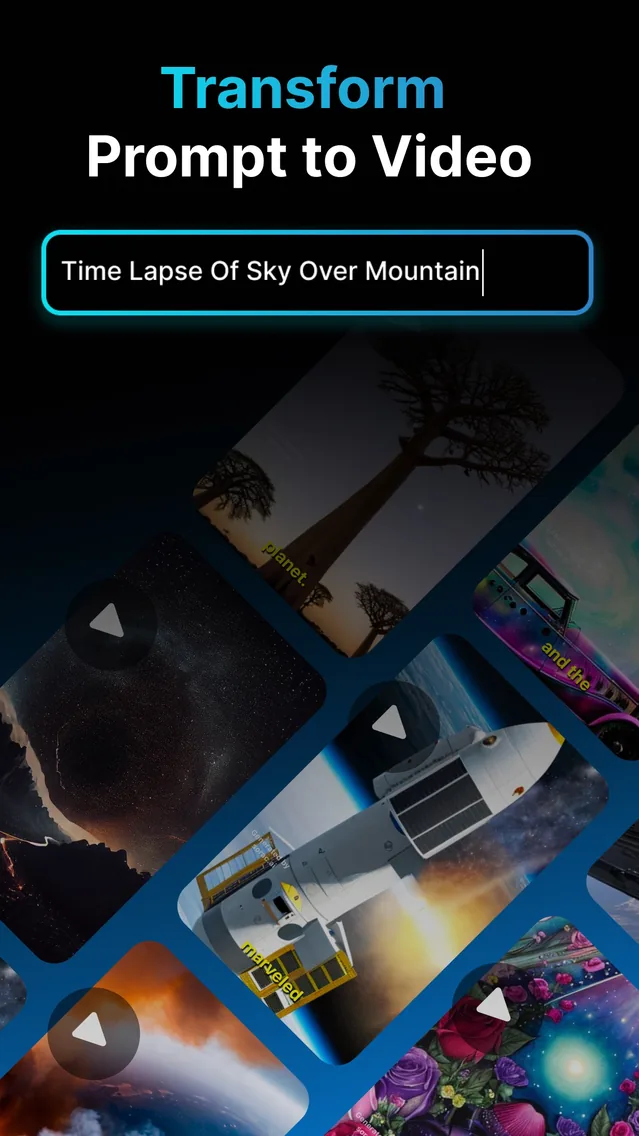
Millions of channels now grow without ever showing a face, because publishing consistently matters more than being on camera. Turning words and images into finished clips means the bottleneck stops being a studio and starts being your ideas. Vodu AI is built for exactly that: it lives on your iPhone, hands you a short, ready-to-post video in about a minute, and is rated 4.5 out of 5 from 24 App Store ratings (as of July 2026).
Why go faceless in the first place?
Faceless content removes the two things that stall most new creators: camera anxiety and production time. You do not need lighting, a set, or hours in an editor. You keep full privacy, you can run several channels or brands at once, and you can batch a week of posts in a single sitting. Because the visuals are generated, your look stays consistent even when your schedule is not.
How to make a faceless video with Vodu AI
The workflow is deliberately short. As a faceless video creator, you are directing prompts rather than a crew:
- Write the beats. Break your idea into a few short scenes — a hook, two or three supporting shots, and a payoff. One clear sentence per scene is plenty.
- Generate each shot. Type a prompt for the first scene and let Vodu's text-to-video create it. Prefer a starting image? Use image-to-video to animate a photo instead.
- Extend what works. If a clip is close but too short, use video extension to keep the motion going and stretch it into a fuller shot.
- Stack and caption. Keep the takes you like, add your voiceover or on-screen text in your posting app, and publish. No face required at any point.
Prompt tip: describe the subject, the camera move, the lighting and the mood in one line — for example, “slow aerial push over a foggy pine forest at dawn, cinematic, soft golden light.” Specific prompts give you cleaner faceless footage on the first try.
Faceless formats that perform
Because Vodu produces B-roll-style clips on demand, it slots neatly into the faceless formats audiences already watch:
- Story-time and narration — AI visuals under a voiceover.
- Fact and list videos — one generated shot per point.
- Relaxing and aesthetic loops — calming scenes for ambient channels.
- Explainer and news-style recaps — illustrative footage behind captions.
The same clips work across a faceless YouTube video, a faceless TikTok, or a Reel — generate once, repurpose everywhere.
What makes Vodu a strong faceless AI video generator
It is fast enough to keep up with a daily posting habit, it is mobile so you can create between other tasks, and it combines the two inputs faceless creators actually use — pure prompts and existing images. First launched as version 1.0 in 2024, it reached version 1.8 in December 2025 (App Store), so the workflow has had time to mature. You are never forced onto a desktop, and you are never on camera.
Start your faceless channel
Download Vodu AI and turn your next script into faceless video — free to try, ready in about a minute.
Frequently asked questions
What is a faceless video generator?
A faceless video generator is a tool that produces watchable video without you filming yourself. Instead of a camera and a face on screen, you supply a prompt or an image and the AI creates the visuals. Vodu AI does this on your iPhone with text-to-video and image-to-video.
Can I really make faceless videos for free?
Vodu AI is free to download and start creating with. Some AI generations and premium features may need an in-app purchase or subscription, which you will see clearly inside the app. Many creators begin on the free tier to test ideas before upgrading.
What niches work best for faceless content?
Story time, “did you know” facts, motivational edits, top-5 lists, relaxing visuals, product explainers and news-style recaps all thrive without a presenter. Vodu is a good fit for any format built from B-roll-style AI clips and on-screen text.
How long does it take to generate a faceless clip?
Most Vodu generations finish in about a minute. You can queue an idea, review the result, and regenerate with a tweaked prompt until the shot matches what you pictured.
Do I keep the rights to what I create?
Videos you generate are yours to post on your channels, subject to the app's terms of use and the content rules of whatever platform you upload to. Avoid prompting real people or copyrighted characters if you plan to monetize.
Keep exploring

Written and reviewed by
Avery Taker
Avery Taker is the byline the Vodu AI creator team writes under — making AI images and videos every day and testing every workflow inside the app before it gets written up here. Illustrated avatar; full disclosure on the about page.