 Vodu
Vodu Free image to video AI — turn a photo into a video
Last updated: July 2026
Vodu AI is a free image-to-video AI app for iPhone. Upload any photo, describe the motion you want, and it turns a still image into a short, shareable video in about a minute — image-to-video, text-to-video, AI photo editing and clip extension in one free-to-download app.
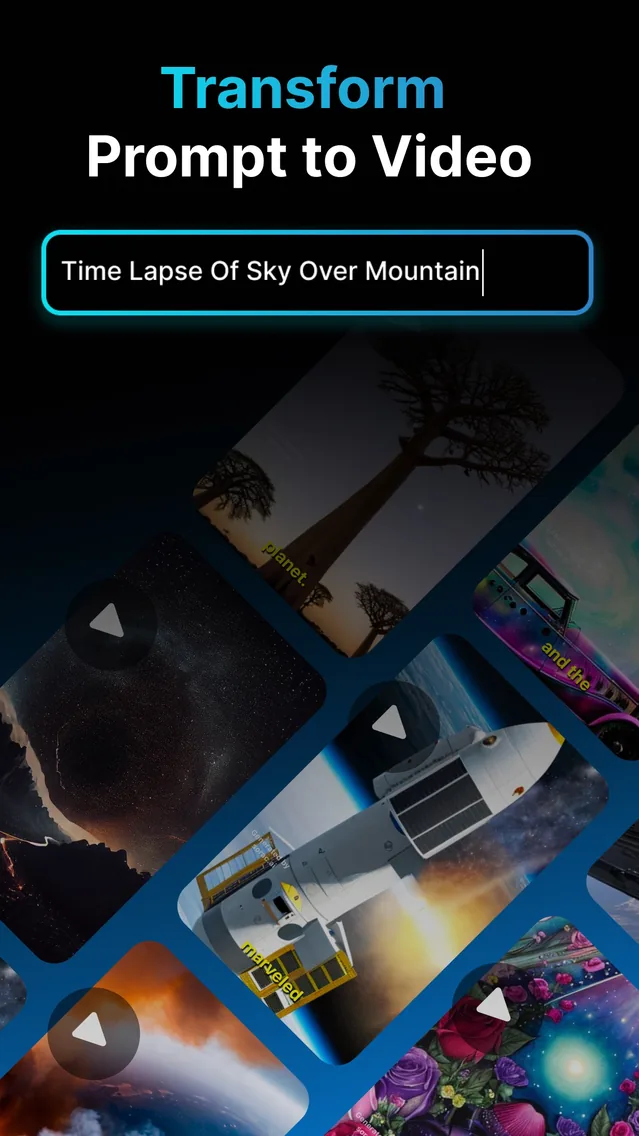
An image-to-video generator takes a still photo and adds motion, so a flat picture becomes a short moving clip. Vodu AI does exactly that on iPhone as a free image to video AI: you upload a photo, describe the movement in a sentence, and the app animates it in about a minute. Image-to-video is one of the four tools in the app — alongside text-to-video, AI photo editing and clip extension — and Vodu is rated 4.5 out of 5 from 24 App Store ratings (as of July 2026), having reached version 1.8 in December 2025 (App Store).
What is an image-to-video generator?
An image-to-video generator is an AI tool that animates a photograph. Instead of stitching stills into a slideshow, it predicts natural movement — a subtle head turn, drifting clouds, flowing hair, a slow camera push — and renders it as real video frames. You keep your original subject; the AI only adds the motion. Because the whole process runs from a single image, you do not need footage, a green screen or any editing experience to get a moving clip.
How to turn an image into a video with Vodu
The workflow is short enough to finish on a coffee break:
- Open image-to-video. Launch Vodu AI and pick the image-to-video tool from the home screen.
- Upload your photo. Choose a clear, well-lit picture you own or have permission to use. A sharp subject animates far more cleanly than a blurry one.
- Describe the motion. Write one short line for the movement you want — “gentle breeze through the hair, slow zoom in” is plenty. Keep it simple for believable results.
- Generate. Vodu animates the still and returns a short clip, usually in about a minute.
- Refine, extend and share. Regenerate for softer or bolder motion, use clip extension to lengthen the shot, then save it or post straight to TikTok, Reels or Shorts.
Prompt tip: name one main movement and one camera move, not five. “Waves roll in, slow aerial push” reads more naturally than a long list of actions. Small, specific motion almost always looks more real than dramatic motion.
Image-to-video vs text-to-video: which should you use?
Both live in Vodu, and they answer different questions. Use this quick comparison to pick a starting point:
| Image-to-video | Text-to-video | |
|---|---|---|
| Starting point | A photo you already have | A written prompt |
| Best when | The subject already exists | The scene lives only in your head |
| You control | The exact subject and likeness | The whole scene, invented from scratch |
| Typical use | Animate a portrait, product or artwork | Build a landscape, effect or B-roll shot |
| In Vodu AI | Yes | Yes |
The short rule: start from an image when you want to keep a real subject and simply add movement, and start from text when no photo exists yet. Many projects use both — a text-generated establishing shot, then a couple of animated photos. For the pure text route, see our script to video workflow.
Is image-to-video really free?
Vodu AI is free to download and free to start with, so “image to video ai free” is an honest description of the way in. You can animate a photo and see the quality before spending anything. What no app can offer is truly unlimited free rendering, because every generation uses real computing power on a server. When you outgrow the free tier, premium subscriptions start at $7.99 per week and there are one-time credit packs (US App Store, as of July 2026); the app shows the exact price before you confirm. See the full breakdown in our pricing sheet.
What you can animate
Because this is a general image-to-video feature, the same few taps cover a lot of ground:
- Portraits — add life to a headshot or an old family photo.
- Products — turn a flat product shot into a scroll-stopping clip.
- Artwork and illustrations — animate a drawing or a poster.
- Landscapes — make water, sky and foliage move.
It is the same engine behind Vodu's photo animator, its AI kissing generator and the AI hug video generator — one feature, several popular effects. If a finished clip ends too early, lengthen it with AI video extension rather than regenerating from scratch. If you only have people photos to animate, please use images of people who have agreed to it and keep clips within the app's terms of use.
Why creators pick Vodu for image-to-video
It is fast, mobile and free to try, and it keeps the whole path — animate, extend, export — on the phone you already carry. First launched as version 1.0 in 2024 and now on version 1.8 (App Store, December 2025), it has had time to mature into a dependable free ai image to video generator rather than a one-off gimmick. For a step-by-step version of this guide, read how to animate a picture with AI.
Animate your first photo free
Download Vodu AI, upload a picture, and watch it move — your first image-to-video clip in about a minute.
Frequently asked questions
Is Vodu's image-to-video generator free?
Yes — Vodu AI is free to download and free to try, so you can turn your first photo into a video at no cost. Higher limits and extra AI generations are unlocked with in-app purchases, and premium subscriptions start at $7.99 per week (US App Store, July 2026). You always see the price inside the app before you buy anything.
How do I turn a photo into a video?
Open Vodu AI, choose image-to-video, upload your photo, and describe the motion you want in one short line. The app animates the still and returns a short clip in about a minute. Regenerate with a calmer or bolder prompt until the movement looks right, then save and share.
What is the difference between image-to-video and text-to-video?
Image-to-video starts from a photo you already have and adds motion to it, so the subject stays exactly as it is. Text-to-video starts from a written prompt and invents the whole scene from scratch. Vodu includes both, and most creators mix them within a single project.
What photos work best for image-to-video?
Sharp, well-lit images with a clear subject animate most cleanly. Front-facing portraits, product shots, artwork and landscapes all work well. Avoid heavy blur, busy backgrounds and harsh shadows, which tend to make the generated motion look unnatural.
Can I make an image-to-video for free with no limits?
You can start free, but genuinely unlimited generation is not realistic on any AI video app because each render uses real computing power. Vodu's free tier lets you test the feature; if you generate a lot, a premium plan or credit pack removes the day-to-day limits. There is no separate charge just to try it.
Keep exploring

Written and reviewed by
Avery Taker
Avery Taker is the byline the Vodu AI creator team writes under — making AI images and videos every day and testing every workflow inside the app before it gets written up here. Illustrated avatar; full disclosure on the about page.