 Vodu
Vodu Lyric video maker — sync words to your music
Last updated: July 2026
Vodu AI is a lyric video maker for iPhone. Generate a moving background with AI, add your lyrics line by line, and time the text to the beat to build a shareable lyric video — a mobile-first lyric video generator with no desktop editor to learn.
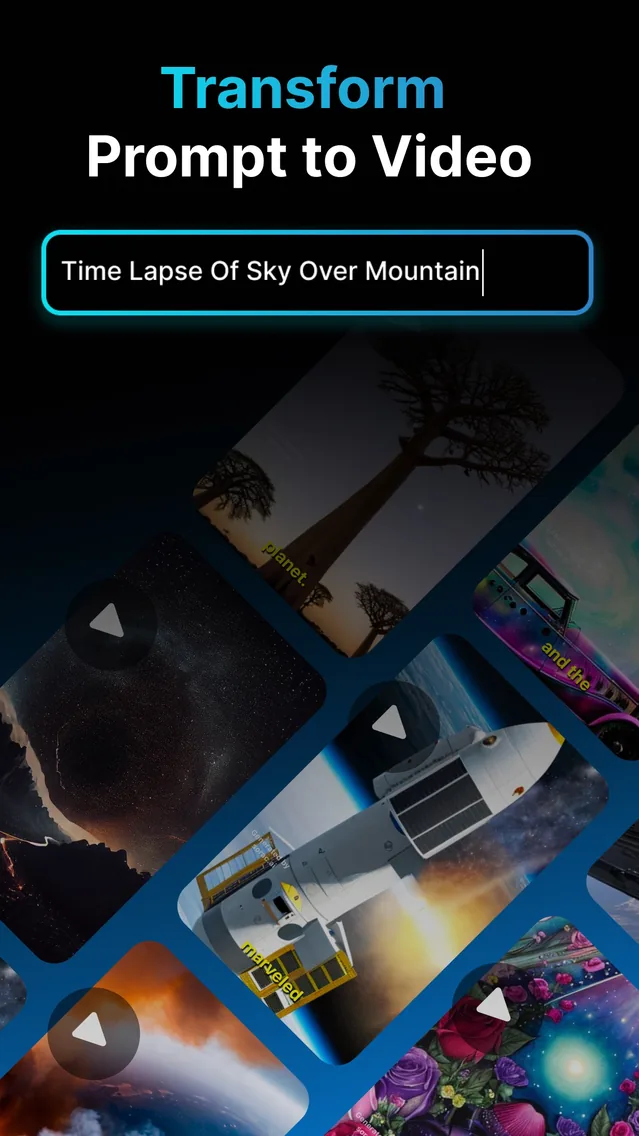
A lyric video maker turns a song's words into on-screen text that appears in time with the music. Instead of static captions, a good lyric video generator pairs the words with a moving background so the video carries the feel of the track. Vodu AI does this on iPhone: generate the visuals, add the lyrics and sync them to the beat, all on your phone. The app is rated 4.5 out of 5 from 24 App Store ratings (as of July 2026) and is now on version 1.8 (App Store, December 2025).
What is a lyric video maker?
A lyric video maker is a tool that displays a song's lyrics on screen, timed to the audio, over a background. The background can be a still image, a looping animation or AI-generated video; the lyrics appear line by line as the song plays. It is one of the most shareable ways to release a track, promote a single or make a song feel finished — no performance footage required.
How to make a lyric video with Vodu
- Generate a background. Use text-to-video or image-to-video to create a moving backdrop that matches the mood of the song.
- Add your lyrics. Type or paste the words and split them into short lines, one phrase at a time.
- Sync to the beat. Time each line so the text appears in step with the music — hold a line through a slow verse, snap the next one in on the beat.
- Export and share. Choose your format — vertical for Reels and Shorts, 16:9 for YouTube — then save and post.
Timing tip: break long lines into two short ones so each phrase lands on a beat and stays readable. Fewer words on screen at once almost always reads better than a full verse crammed into one frame.
Mobile lyric video maker vs desktop tools
Most lyric-video guides point you at desktop software. That can be powerful, but it is rarely the fastest route for a creator working from a phone. Here is the honest trade-off:
| Approach | Where it runs | The trade-off |
|---|---|---|
| Vodu AI | iPhone app | Generate the background and add synced lyrics on your phone in minutes; mobile-first. |
| After Effects templates | Desktop (macOS / Windows) | Precise and highly customisable, but paid software and a real learning curve. |
| Browser lyric editors | Web | No install, but uploads, sign-ups and watermarks are common on free tiers. |
If you want frame-perfect motion graphics and you already live in a desktop editor, After Effects wins on control. If you want a good-looking lyric video out the door from your phone, a mobile video lyric maker like Vodu is the more direct route.
Free lyric video maker — and other apps people try
Vodu is free to download and free to start, so your first lyric video costs nothing; premium plans start at $7.99 per week (US App Store, as of July 2026) when you create at volume, shown before you buy. It is worth being honest about alternatives, too: CapCut (and the apps people now leave it for) is a popular free mobile editor and many people build a CapCut lyric video by adding text keyframes over a clip — it works, but you supply and animate the background yourself. Vodu's angle is different: it generates the AI background and handles the synced lyric text in one app, so you are not stitching a look together from stock clips. Whichever you pick, the lyric-timing craft is the same.
Make your first lyric video free
Download Vodu AI, generate a background, and sync your lyrics to the beat — a shareable lyric video from your phone.
Frequently asked questions
Is there a free lyric video maker?
Yes. Vodu AI is free to download and free to start, so you can make your first lyric video at no cost. Extra generations and higher limits come through in-app purchases, with premium plans from $7.99 per week (US App Store, July 2026). The price is shown in the app before you buy.
Can I make a lyric video on my phone?
Yes — that is the whole point of Vodu. It is an iPhone app, so you generate the background, add your lyrics and time the text to the beat all on your phone, with no desktop software. Most desktop lyric-video tools need a computer and a learning curve; Vodu keeps the whole job mobile.
How do the lyrics sync to the music?
You add your lyrics line by line and time each line to the beat, so the words appear in step with the song as it plays. Working a line at a time gives you control over the pacing — hold a line on a slow verse, snap the next one in on the drop.
Can I use any song in my lyric video?
Only use music you have the rights to — your own track, a licensed song, or royalty-free audio. Popular songs are copyrighted, and social platforms can mute or remove videos that use them without permission, so check the rights before you publish.
What size should a lyric video be?
It depends where it is going: vertical 9:16 for Reels, Shorts and TikTok, square or 4:5 for the Instagram feed, and 16:9 for YouTube. Vodu generates the background in the format you need, so pick your destination before you start and keep the lyrics comfortably inside the frame.
Keep exploring

Written and reviewed by
Avery Taker
Avery Taker is the byline the Vodu AI creator team writes under — making AI images and videos every day and testing every workflow inside the app before it gets written up here. Illustrated avatar; full disclosure on the about page.